Reporting & analytics
The CEO needs to know “how much profit we made this month” — but the answer sits in 5 different systems. Analytics consolidates data from POS, OMS, WMS, and CRM into visual reports: revenue and orders by channel, profit analysis by product (SKU), customer retention & LTV, purchasing performance, inventory value, and cash flow — ready for every Board meeting without waiting on IT.
Metrics live in POS, the web store, warehouse, and finance — each team keeps its own spreadsheet. Leadership waits on IT for a consolidated view; by then the numbers are stale and decisions are late.
Executives get answers immediately — no report queue, no SQL, no IT dependency. Reports draw straight from the system, and switching views takes a few clicks.
Core capabilities
Data flows directly from POS, OMS, WMS, and CRM inside one stack — no manual imports, no heavy ETL, no bolt-on BI tool. Every figure comes from the same system.
Revenue monitoring
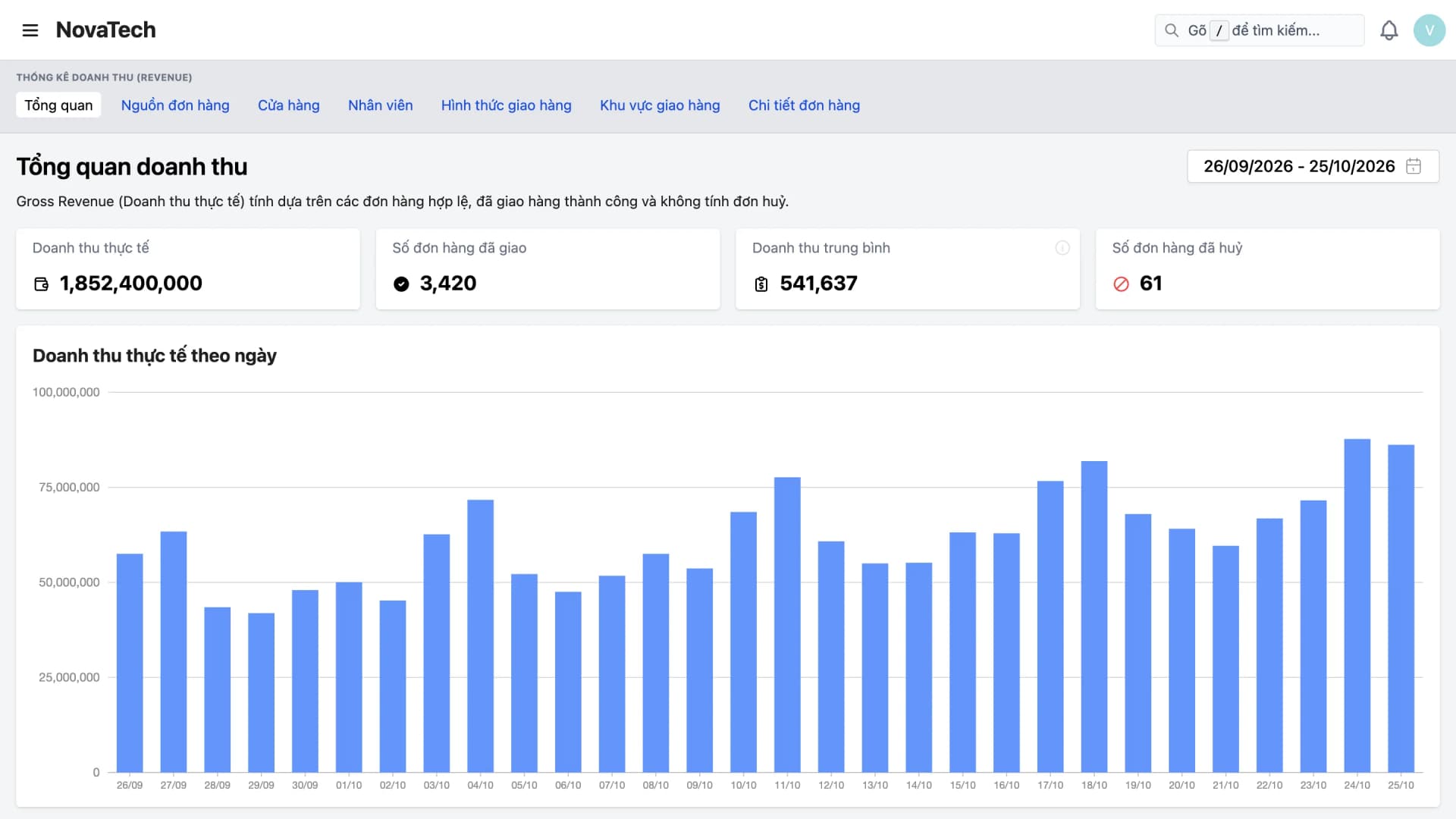
Tell GMV (value of valid orders) apart from actual revenue (delivered orders only) with Order Statistics and Revenue Statistics. View by store, order source, region, staff member, and delivery method; follow trends in daily charts.
Channel performance (channel ROI)
Rank branches and stores by sales. See revenue mix from web, app, POS, marketplaces, and affiliates — know which channels fund growth so you can allocate budget with confidence.
Purchasing Performance & Purchase Price Variance
Purchasing performance by supplier or staff member: fulfillment rate, lead time, rejection rate, and PO cancellation rate with reasons — click a figure to see each PO. Purchase price variance shows how buying prices move, with price history.
Cash Flow & Inventory Value
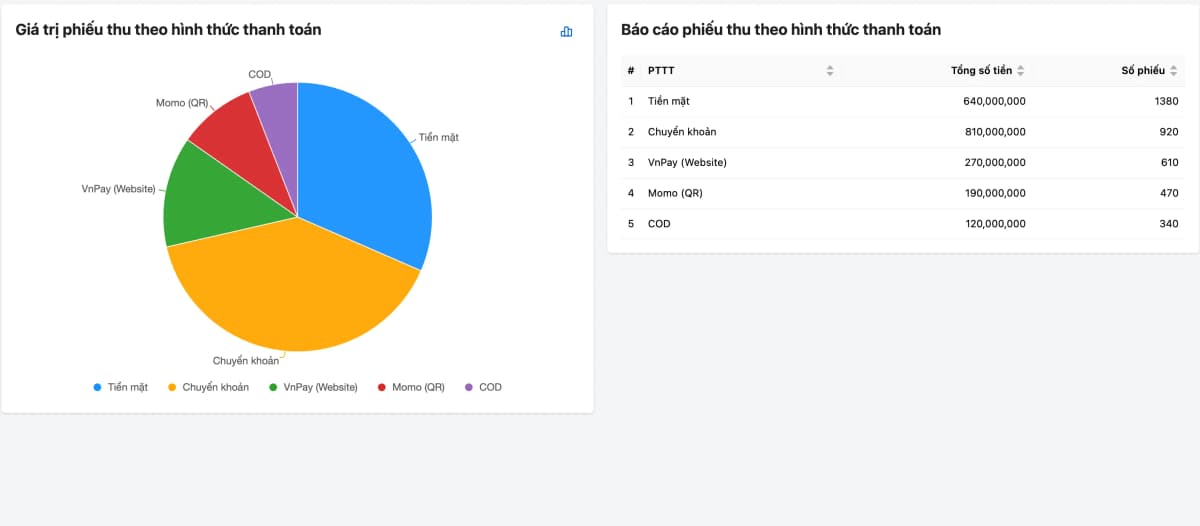
Cash flow statistics split into receipts and payments, by payment method, store, and partner (customer, supplier, staff). The Inventory Value report shows how much capital is tied up in stock at each warehouse, valued at cost.
Customer Retention & LTV
Customer Retention report: new customers, returning customers, repeat customers, repeat purchase rate, average LTV, and the gap between purchases. Click any figure to see the customer list — no SQL needed.
Feature deep dive
From revenue, sales channels, and customer retention to purchasing, cash flow, and inventory.
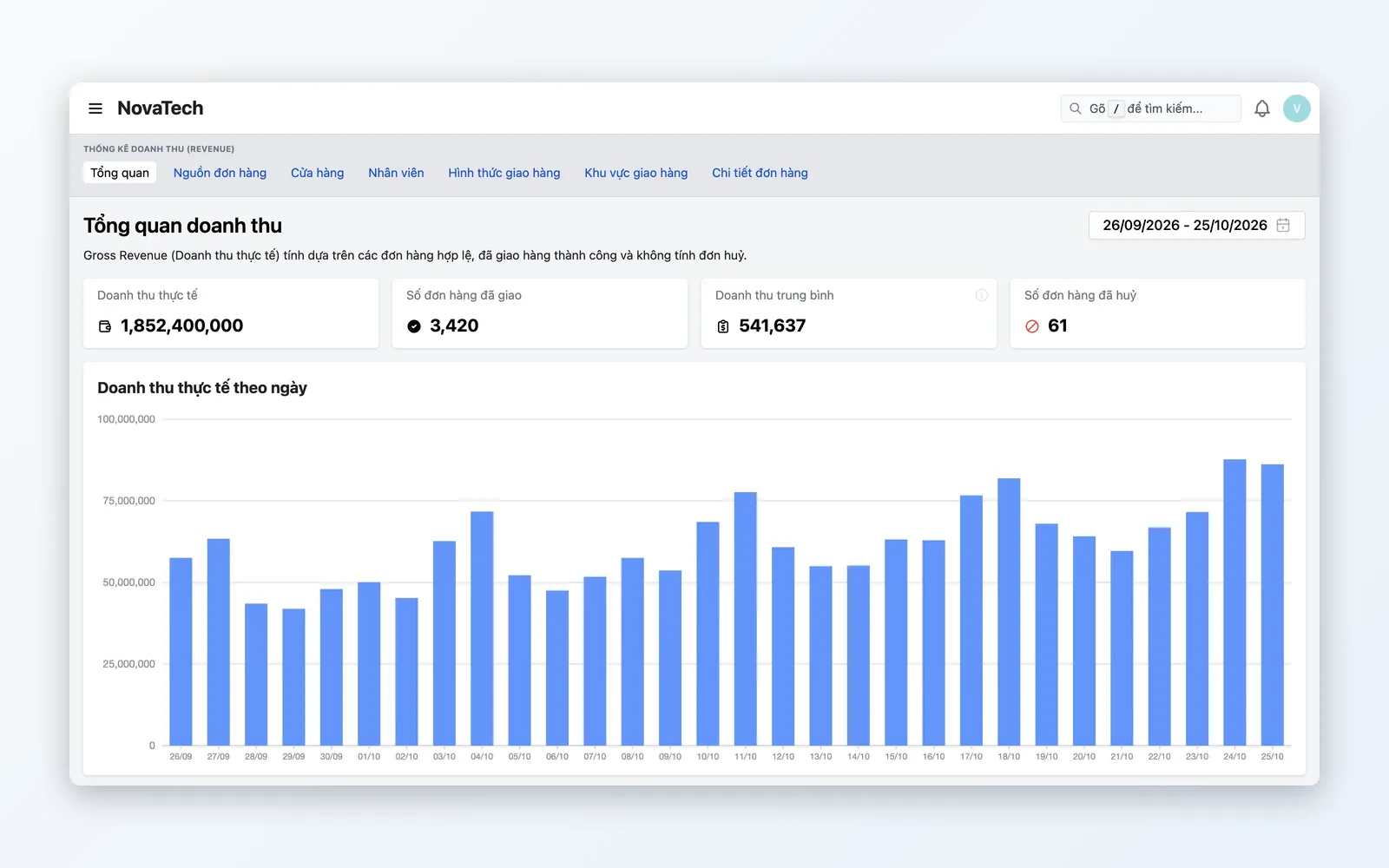
Revenue monitoring & multiple views
Tell GMV from actual revenue — then view it by store, order source, staff member, region, and SKU.
- Separate GMV (valid orders) from actual revenue (delivered orders only)
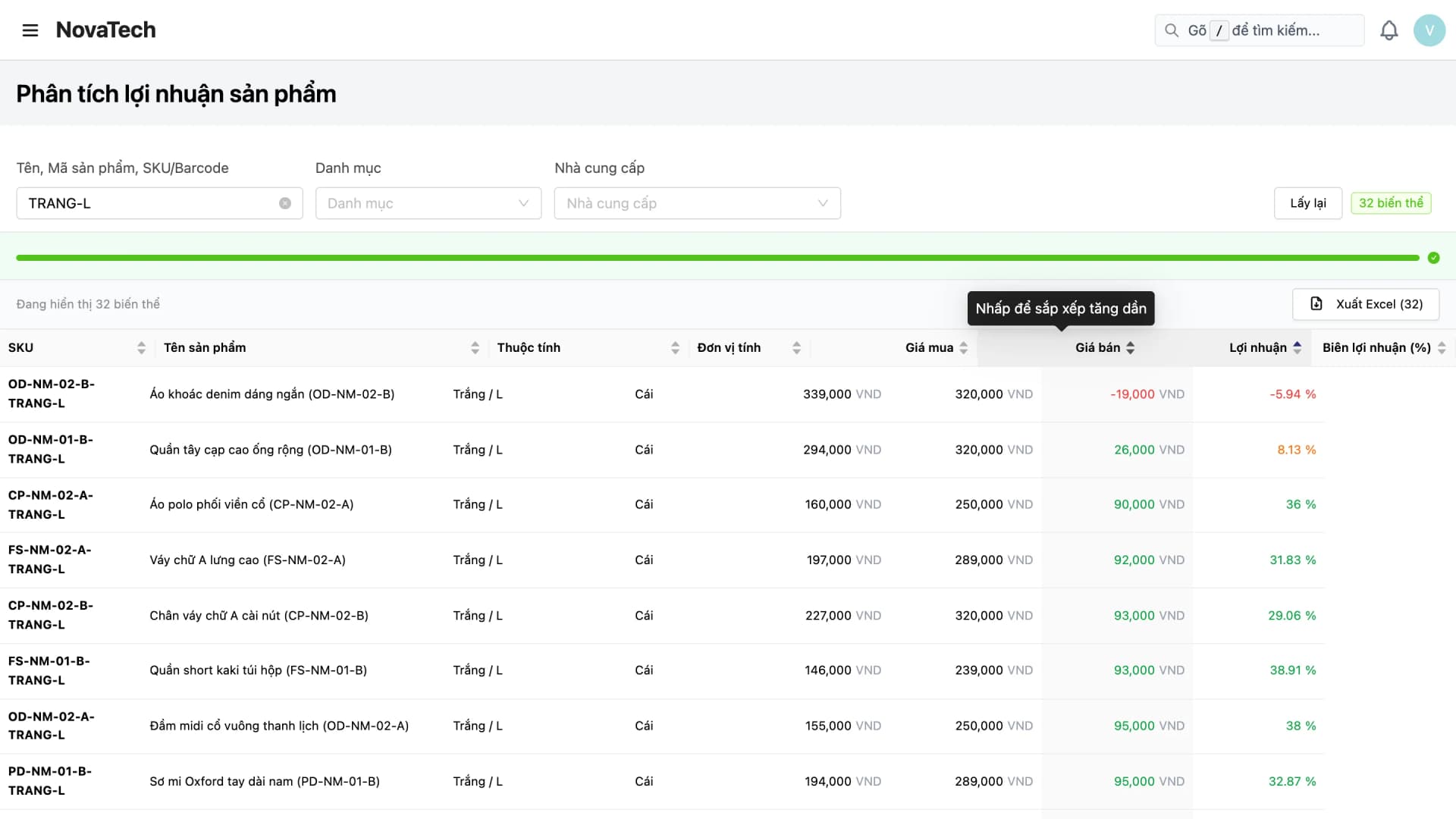
- Profit analysis by product (SKU): selling price, cost, profit, and stock
- Daily charts and grouped tables for the period you choose — follow upward and downward trends
- Switch quickly between views: order source, store, staff, delivery method, region, SKU
- Excel export on the Purchasing performance, Purchase price variance, Customer retention, Cost of goods, and Inventory value reports
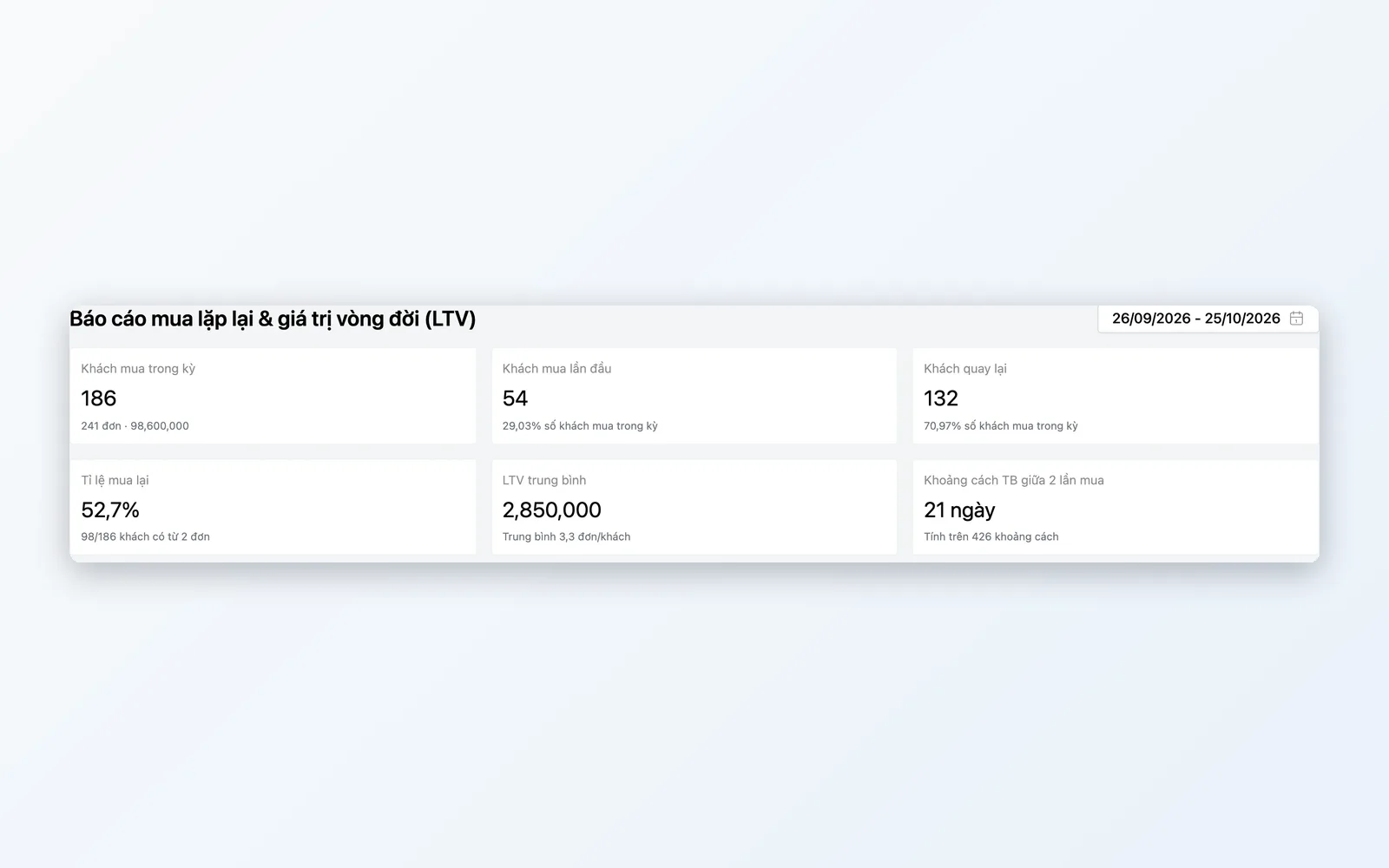
Sales Channels & Customer Retention
Know which channel brings in the most money, and which customers keep coming back.
- Rank branches and stores by sales, order count, and AOV
- Revenue mix: web, app, POS, marketplaces, affiliates
- Customer Retention & LTV: new, returning, repeat — click to see customer lists
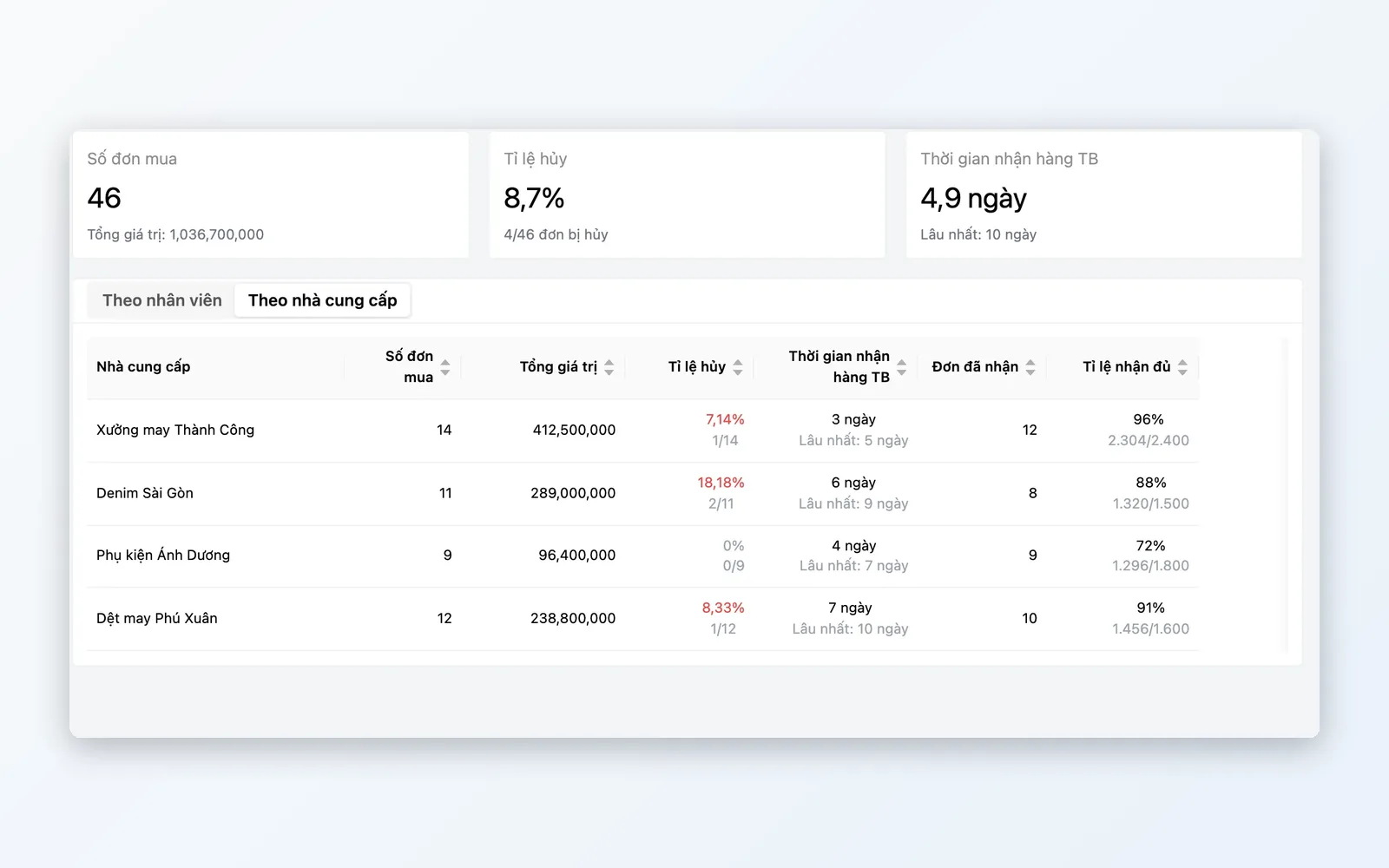
Purchasing & Buying Prices
See clearly which suppliers deliver well and which buying prices are rising.
- Purchasing performance: fulfillment rate, lead time, and rejection rate by supplier or staff member
- PO cancellation rate and reasons; drill down to each PO, export to Excel
- Purchase price variance: buying price movements by product, with price history
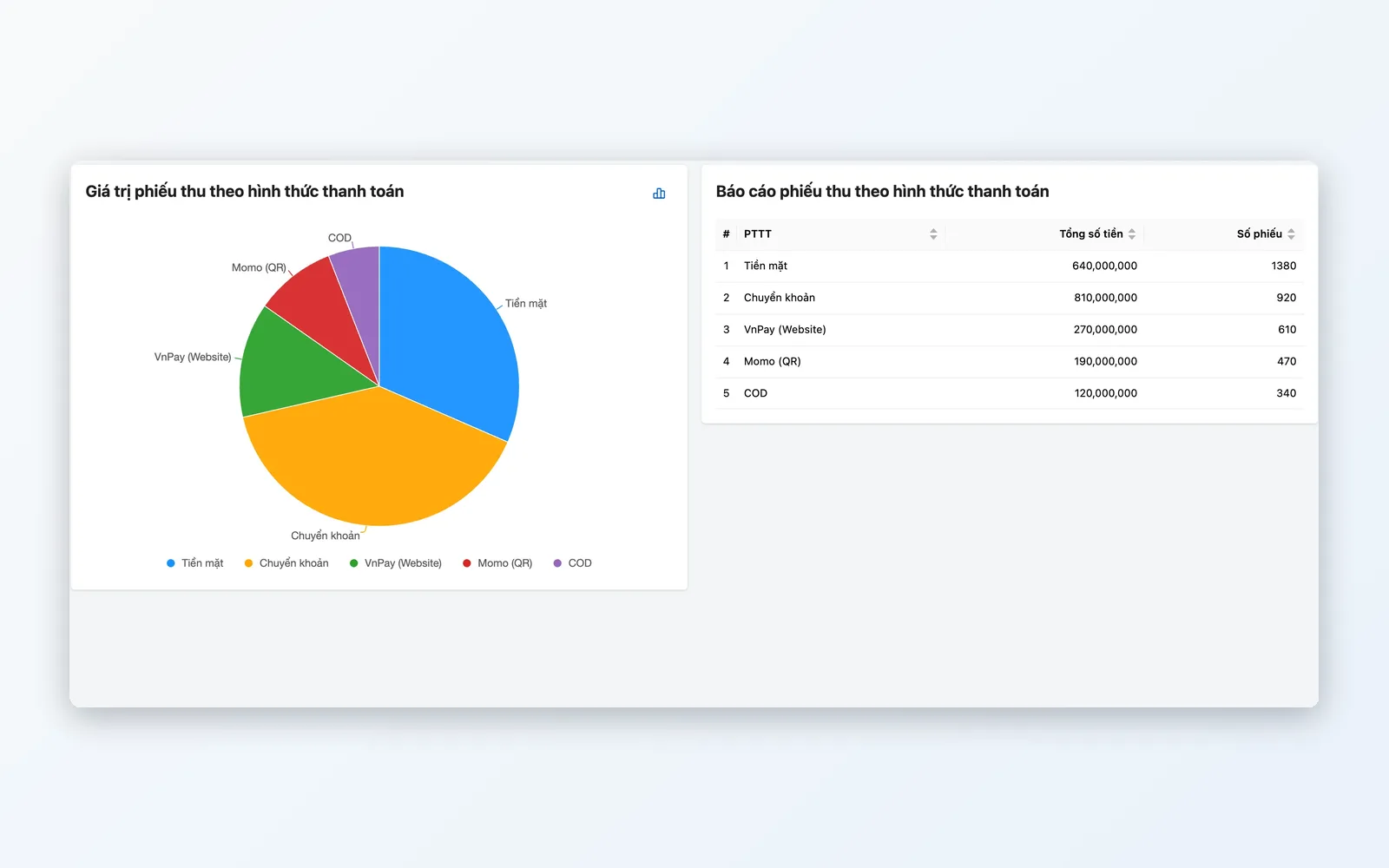
Cash Flow & Inventory Value
Know where money comes in and goes out — and which warehouse holds your capital in stock.
- Cash flow statistics: receipts and payments by payment method and by store
- Receipts and payments by partner: customers, suppliers, staff
- Inventory value by SKU and warehouse, valued at cost
From data to decision
Data comes straight from the system → aggregates → visualizes → drills → exports — without IT babysitting every refresh.
Data capture
Pulled directly from POS, OMS, WMS, and CRM in one system — no manual imports.
KPI aggregation
Calculate revenue, AOV, repeat purchase rate, LTV, and purchasing performance.
Visualization
Interactive reports: daily charts and tables grouped by the period you choose.
Deep analysis
Switch between views: order source, store, staff, region, SKU.
Reporting
Export to Excel from supported reports for the Board meeting.
Data capture
Pulled directly from POS, OMS, WMS, and CRM in one system — no manual imports.
KPI aggregation
Calculate revenue, AOV, repeat purchase rate, LTV, and purchasing performance.
Visualization
Interactive reports: daily charts and tables grouped by the period you choose.
Deep analysis
Switch between views: order source, store, staff, region, SKU.
Reporting
Export to Excel from supported reports for the Board meeting.
From data to decisions in one system
Not just pretty charts — the right answer, on time, for the right leader.
Weekly leadership reviews
The CEO picks a reporting period → sees revenue by store and order source, and which channels are declining. Switches to the order-source view → sees Shopee's share of revenue and orders → decides to reallocate budget to the owned channel. No PowerPoint slides needed.
Tracking cash flow & inventory across a retail chain
The chief accountant opens Cash Flow Statistics: receipts and payments by method and by store, then split by partner to see which come from customers and which go to suppliers. At period end, they open Inventory Value to see how much capital is tied up in stock at each warehouse.
Quarter-end supplier review
The purchasing manager opens Purchasing Performance by supplier: fulfillment rate, lead time, and rejection rate. Clicks a supplier with a long lead time to see each PO, then opens Purchase Price Variance to check whether buying prices have risen unusually.
Why Oviro Analytics?
Oviro report data isn't imported from outside — it flows directly from POS, OMS, WMS, and CRM in the same system. No separate BI tool, no complex ETL. Every figure comes from a single source, ready for Board meetings.
From data to decisions in one system
Consolidated reports from POS, OMS, WMS, and CRM in one system. See revenue from multiple angles, plus customer retention, purchasing performance, and inventory value — no SQL, no waiting on IT.