Catch-weight goods
Goods sold by weight that still have to be counted by the piece — fish, meat, poultry. Oviro tracks weight and piece count side by side across the whole supply chain: product setup, receiving, selling, stocktakes, and supplier payables — so discrepancies surface immediately instead of at period-end reconciliation.
Catch-weight goods like fish, meat, and poultry are usually tracked by software on ONE measure — either weight or quantity. You weigh 50 kg of fish but count only 47 pieces; how many pieces are missing, and whether the average size matches the estimate, is something nobody catches until the goods have been received, sold, and counted — sometimes even paid for.
Every step in the catch-weight supply chain records weight and piece count side by side — discrepancies surface immediately, not at month-end reconciliation.
Core capabilities
Weight and piece count are recorded together at every step — from product setup to supplier payment, no step relies on a single measure.
Catch-weight product setup in PIM
Turn catch-weight mode on per product right in PIM — distinguishing ordinary weight-based goods from catch-weight goods tracked by weight and count, with an estimated weight per unit as the reference point.
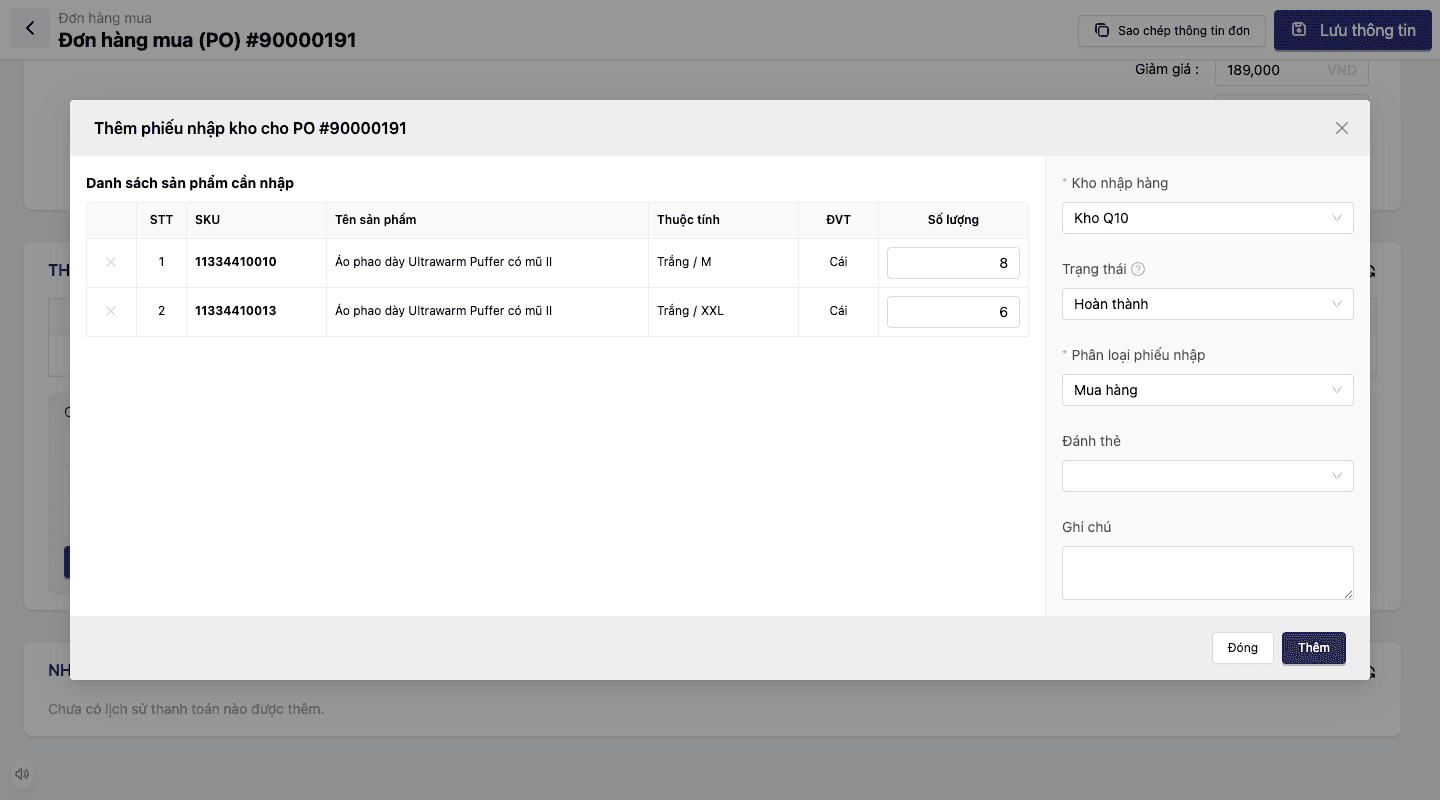
Receiving: weight and count recorded together
Each receiving slip records accepted and rejected weight and piece count separately, batch by batch — never collapsed into a single measure.
Selling: expected vs. actual count
Every order line shows both the expected and the actual piece count alongside the weight — shortfalls surface as the order is processed.
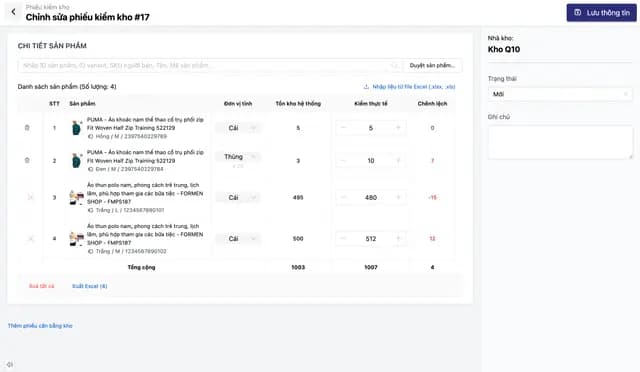
Stocktakes: piece-count variance calculated automatically
Compare the system's piece count against the physical count during a stocktake and compute the variance automatically — catching problems even when total weight still matches.
Payables: the exact weight and count confirmed
Supplier payables reflect exactly the weight and piece count confirmed at receiving, which avoids payment disputes.
Feature details
From setup in PIM through receiving, selling, stocktakes, and payables reconciliation — weight and piece count always travel together.
Setup in PIM
Turn catch-weight mode on per product from the moment it is created.
- Choose the mode: ordinary weight-based goods, or catch-weight goods tracked by weight and count
- Set an estimated weight per unit (e.g. one basa fish ≈ 1.05 kg)
- Applied per product, with no effect on your other weight-based products
Receiving on both measures
Each receiving slip records weight and piece count separately — never merged.
- Record accepted weight and rejected weight per batch
- Record the matching accepted and rejected piece counts for that same batch
- Reconcile against the purchase order immediately — spot a count gap even when the weight matches
Selling & order processing
Every order line carries the piece count and the weight together.
- Expected and actual piece counts alongside the weight on each order line
- Applies end to end, from warehouse picking through to selling at POS
- Catch a count shortfall while the order is being processed, not at the next stocktake
Stocktakes & payables reconciliation
Spot the variance during the stocktake, and carry it through correctly to supplier payables.
- Compare the system's piece count with the physical count
- Compute the variance automatically — flag it even when total weight still matches
- Supplier payables reflect exactly the weight and piece count confirmed
The catch-weight lifecycle
From setup in PIM → receiving → selling → stocktake → supplier payables — weight and piece count side by side at every step.
Setup in PIM
Turn weight-and-count mode on for catch-weight products and set the estimated weight per unit.
Receiving
Record accepted and rejected weight and piece count side by side, batch by batch.
Selling
Record expected and actual piece counts along with the weight on every order line.
Periodic stocktake
Compare the system's piece count against the physical count and compute the variance automatically.
Supplier payables
Reflect exactly the weight and count confirmed at receiving.
Setup in PIM
Turn weight-and-count mode on for catch-weight products and set the estimated weight per unit.
Receiving
Record accepted and rejected weight and piece count side by side, batch by batch.
Selling
Record expected and actual piece counts along with the weight on every order line.
Periodic stocktake
Compare the system's piece count against the physical count and compute the variance automatically.
Supplier payables
Reflect exactly the weight and count confirmed at receiving.
Real-world scenarios
Three moments when the gap between weight and piece count shows itself — and where the system catches it.
50 kg of basa fish received, 47 pieces counted
The receiving slip records both weight and piece count at the moment goods arrive — the missing pieces show up immediately, instead of surfacing at the end of the day or at the next stocktake.
A stocktake finds a count variance even though the weight matches
Total weight still agrees with the books, but the physical piece count differs from the system — a sign of a piece-size problem or shrinkage that needs tracing now, rather than being waved off because the weight looks right.
Reconciling supplier payables
The weight and piece count confirmed at receiving are the basis for reconciling payables — avoiding later disputes when supplier and buyer hold different numbers.
Weight and count travel together through every step, not just on a settings screen
In most software, weight-and-count is a toggle on one isolated screen. At Oviro it is a data field that runs through the entire product lifecycle — from setup in PIM, receiving in the warehouse (WMS), and order processing (OMS), through to stocktakes and supplier payables (Purchasing/Payables) — so weight and piece count never fall out of step at any point.
No more catch-weight shrinkage
Weight and piece count tracked side by side and consistently, from receiving through selling and stocktakes to supplier payables — discrepancies surface right away, not at period-end reconciliation.