Receiving & put-away, in depth
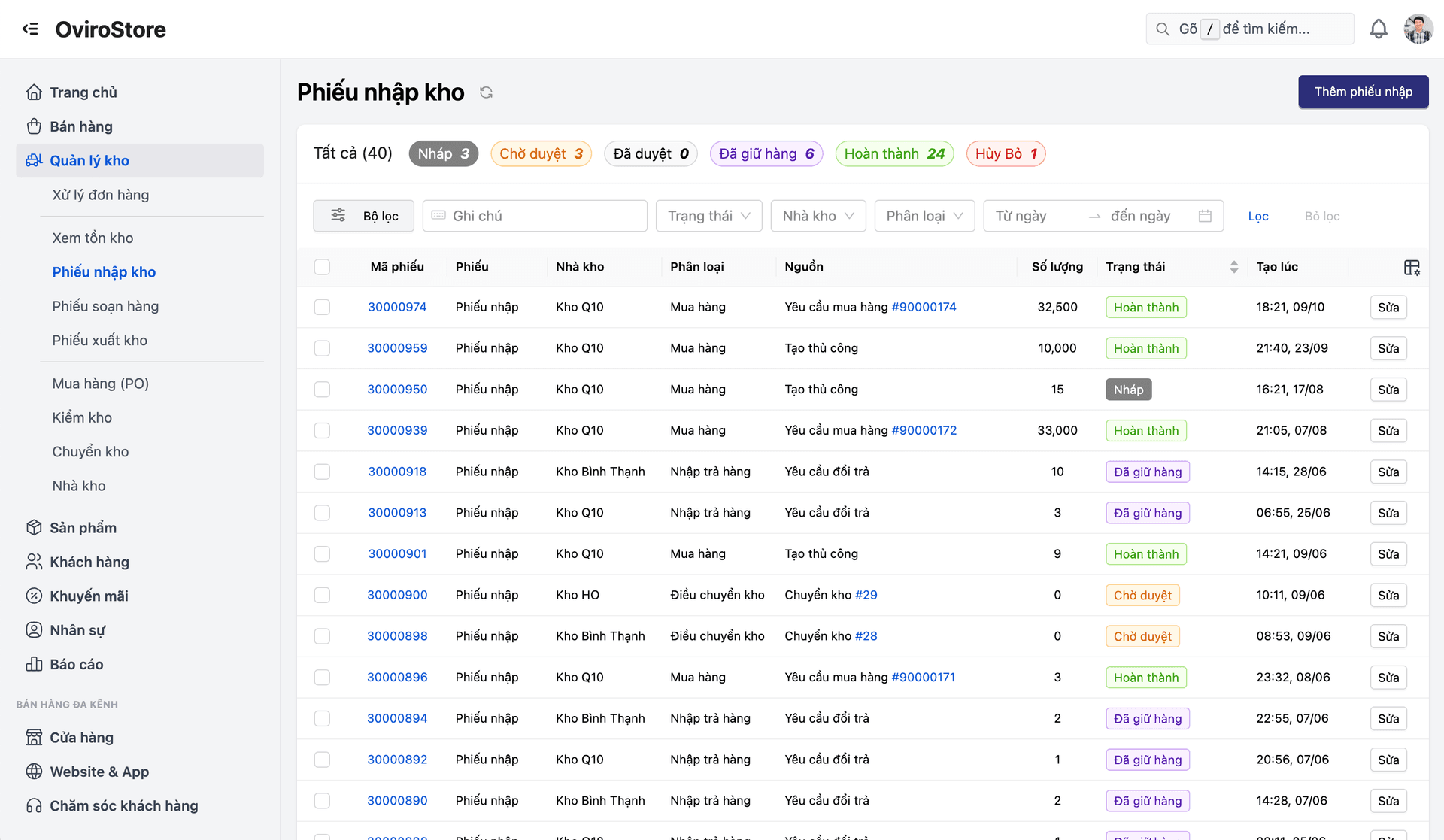
Not just a "goods arrived" screen — this is a complete receiving process with an independent quality assurance step before stock officially counts as inventory. Create a receiving slip from an approved purchase order, count, inspect quality, and post only the goods that pass — damaged and short items never reach sellable stock.
Manual receiving is error-prone and has no independent quality gate — damaged goods and short deliveries usually get mixed into sellable stock before anyone notices. Discrepancies with the supplier surface far too late, or never at all.
A staged, controlled receiving process — every PO shipment goes through counting → QA → and only then into stock, so defective goods never slip quietly onto your shelves.
Core capabilities
From creating the receiving slip to goods officially hitting the shelf, every step is controlled and fully traceable — nothing gets skipped.
Create receiving slips from approved purchase orders
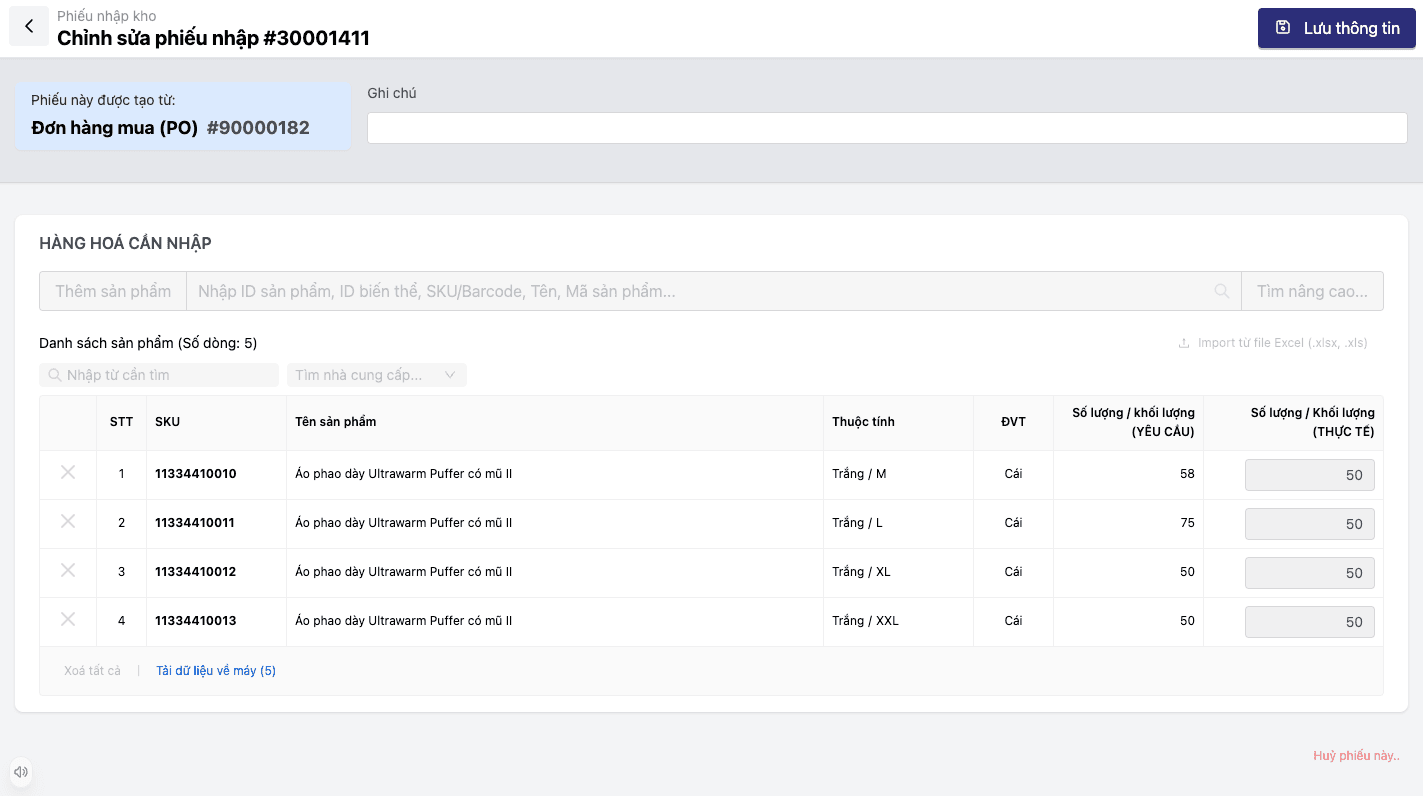
Generate a receiving slip straight from an approved PO, inheriting the full line list and ordered quantities — nothing re-keyed from scratch.
Count against each PO line
Match the quantities actually received against every line of the original purchase order, surfacing gaps between ordered and received right away.
A separate QA/inspection mode before stock posting
Inspection mode locks received quantities by default while QA runs, so nobody edits a count by accident mid-inspection.
Damaged and rejected quantities kept apart from accepted goods
Damaged or rejected quantities are recorded separately, never mixed into the accepted quantity that goes into stock.
Print receiving slips & track by serial/batch
Print an A4 receiving slip for your records, and track received goods by individual serial number — fully connected to the rest of WMS.
Feature details
From creating the slip and counting through quality inspection to controlled put-away and supplier discrepancy reporting.
Create & manage receiving slips
Start a receiving slip directly from an approved purchase order and track the status of each one.
- Create receiving slips from approved POs, inheriting the line list and ordered quantities
- Receiving slip list by status: pending, counting in progress, completed
- Each receiving slip is tied to exactly one PO for clear traceability
- Print A4 receiving slips for archiving and internal cross-checks
Counting & PO matching
Match ordered quantities against what actually arrived, line by line.
- Count against each PO line rather than the slip as a whole
- Surface gaps between ordered and received quantities immediately
- Recorded counts become the basis for the QA step that follows
Independent quality assurance
A dedicated inspection step, separate from counting, before goods count as inventory.
- Inspection mode locks received quantities by default — no accidental edits during QA
- Damaged and rejected quantities recorded separately from accepted goods
- Only goods that pass QA are eligible to be posted to stock
Controlled put-away & discrepancy reporting
Only accepted goods reach inventory — discrepancies go straight back to the supplier.
- Post and put away only the quantities that passed QA and were accepted
- Track received goods by serial/batch, connected to WMS
- Report discrepancies between ordered, received, and accepted quantities to the supplier
The five-step receiving process
From creating the slip → counting → QA → put-away → discrepancy report — one closed control loop with no step skipped.
Create the slip from an approved PO
Generate a receiving slip directly from an approved purchase order.
Count the goods against the PO
Match the quantities actually received against every line of the original PO.
Inspect/QA, record damage and rejections
Independent quality inspection, with received quantities locked to prevent accidental edits.
Post to stock and put away
Only the quantities that passed QA and were accepted reach inventory.
Report discrepancies to the supplier
Any gap between ordered, received, and accepted quantities goes to the supplier immediately.
Create the slip from an approved PO
Generate a receiving slip directly from an approved purchase order.
Count the goods against the PO
Match the quantities actually received against every line of the original PO.
Inspect/QA, record damage and rejections
Independent quality inspection, with received quantities locked to prevent accidental edits.
Post to stock and put away
Only the quantities that passed QA and were accepted reach inventory.
Report discrepancies to the supplier
Any gap between ordered, received, and accepted quantities goes to the supplier immediately.
Real-world scenarios
Three situations where a separate QA step before stock posting makes an immediately visible difference.
Receiving a large PO shipment without fearing quantity gaps
The slip is generated straight from the approved PO, and line-by-line counting surfaces any gap between ordered and actually received quantities right away — even on a shipment with hundreds of line items.
Catching defective or damaged goods at QA, before they count as sellable stock
Inspection mode locks received quantities during QA, and damaged or rejected items are recorded separately — so only goods that pass are officially posted to stock.
Reconciling and reporting discrepancies to the supplier the moment they appear
Every gap between ordered, received, and accepted quantities is recorded against a specific receiving slip, giving you clear evidence to take back to the supplier.
How this differs from an ordinary "goods arrived" screen
Most simple receiving flows post to stock the moment goods are recorded — good and defective items land in the same inventory. Oviro separates out an independent quality assurance step, locks received quantities during inspection to prevent accidental edits, and only lets goods that passed QA be officially posted to stock. Everything received is also tracked by serial/batch, wired directly into the rest of WMS.
Controlled receiving, inventory you can trust
An independent quality assurance step before stock posting makes sure defective and short goods never slip quietly into sellable inventory.